Some Fluff You Can Skip
I used to live in the mountains, and back then I kept a workstation in the shed so it was tolerable to go in there in the dead of winter, or so I could really crank when I needed to during periods I had limited power due to being off-grid. Good heat to you this time of year, and happy holidays to you and yours as well.
My x58 got pretty dirty being pretty much outside 2-3 years after I purchased this motherboard back from a customer prior to this, and as it turns out she still purrs. It was she who ran like a beast in my shed then for rendering tasks, and it’s still true that she is a beast now as my primary machine. Simply put: built like a tank.
I even lost a core before I replaced the consumer processor with a Xeon for a dollar or two. Yes, you read that right. And when the old processor had that core go out I was able to simply disable it in the bios and it was back to business for around a year before I finally got around to replacing.
There is a small issue with the bios not having a thermal sensor which is fine if you simply blow a case fan across the north bridge heat sink. That’s that one that sits between the graphics card and the processor, it gets a little hot. And it is a chipset which is particularly tunable, that can be a good thing and a bad thing! Any fellow undervolt enthusiasts out there?
The Guide

I was finally able to get Clover to work using this guide. The other solutions might have worked, but I couldn’t figure them out, so this in fact worked for me. I didn’t seem to notice a virus, but that does not mean there was not one. If we don’t hear any replies to my post we might know it’s ok after some time? Cheers.
The only thing really that I would add is that the Windows iso portion is optional if you already have Windows installed on your desired NVMe, and to also highlight that there are two helpful png images, a readme, and of course the video to get you where you want to be quickly.
Hashtag #eVGA x58 Sli3 Motherboard + Generic NVMe Drive
Optional? The following guide might have worked for me to have native NVMe without a bootloader drive (USB in my case), except that my NVMe drive was not natively registered with the modded bios , and they are no longer generating custom bios’ for new NVMe drives:
That’s not to say in the year 2025 / 2026 we can’t ask ChatGPT to help us to do this ;). Or better still to keep those human forum threads red hot!
I was at least able to get the bios to this version 2022 modded, which I’m not sure if it helped my own situation (and performance) or not, it’s why I mention.
That’s it, That’s the Whole Guide..
Results
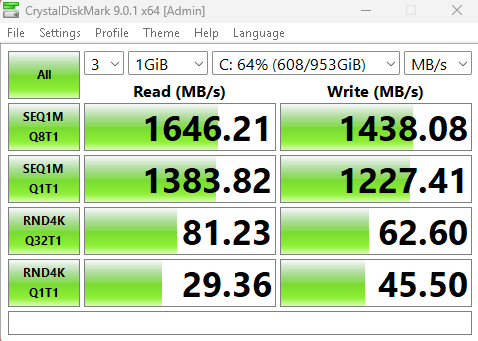
Not bad for a mostly-full 1TB TEAMGROUP with the below paper specs and a $2 PCIEx16 adapter. I’ll have to follow up with a faster NVMe for a fairer look at our motherboard’s expected greater ceiling performance.

expected greater ceiling performance…
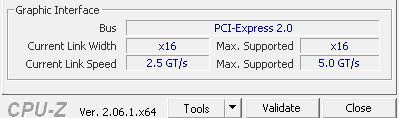
Why X58 in 2025 / 2026?
Why not! Have you noticed the thickness of newer motherboards is lacking in quality? This older eVGA SLi3 is ancient (2011?) but still able to rock 6 cores and 12 threads and I do still consider them fast threads. That’s because I’m able to rock 24GB of super fast DDR3 Mushkin memory.
And it natively supports SLi so a future project for me anyways will include the ability to run 2 x RTX 2060 12GB (yes 12GB) in SLi to achieve a cheap consumer-grade 24GB’s effective (in certain narrow applications).
And, if I decide to overclock my processor which comes from the golden age of overclocking:
I can feel zero guilt about frying my ancient board. Well, actually I would feel pretty bad as there is some nostalgia, for me. I’ve found the more mature I get, the more I appreciate taking care of and enjoying cherished remembrances - BEEP!
Speaking, since I was able to pick up multiples of these processors (X5650 in my case) for the price of peanuts, I have plenty of spare 6 core processors! And for the time being the motherboard would be fairly cheap to replace too (probably the best defense there is against the infamous EMP scenario being that it’s affordable to keep a spare in proper cold storage).
The majority of what I’ve conveyed being the same for other families circa this era…
Oh, if you might be wondering why I went through all this trouble to find out how good these old diamonds really still are? I fried three newer motherboards this year working on analog HDGL with ultra-high precision. Apparently that can be pretty stressing on AMD processors! Or maybe these were backdoor hardware-eating-itself attacks causing this ruckus? I guess we’ll never know?..
So, as for my own story, I am down to my 4th-string board (and feeling pretty content actually) in the year 2025 / 2026 rocking x58 6 cores / 12 threads. 
Do you ever feel like technology is going backwards with time? I sure do.
In fact, did you ever consider that all these vulnerabilities we had been hearing about do not apply to older tech? Well, had ya? Well, do ya now..


Source: https://medium.com/@thedominator925/the-86-bears-were-better-than-the-85-bears-let-me-tell-you-why-4d95bbf58e38
And Then There are NEW Critters Like These Being Sighted in the Wild…
Makes sense to me.
You can do this for other chipsets…
Introducing the StealthMachines Tradecraft -
Featuring the MACHINIST X99 (LGA 2011-3), the last consumer chipset to support Xeon with a 2025 refresh, which can finally get you economically to 20 or more fast threads. Ask about stacking motherboards!